.avif)
TL;DR
Loom is the market-leading async video messaging platform, used by millions of teams globally for screen recording, video walkthroughs, and asynchronous communication.
Atlassian acquired Loom in 2023 for $975 million.
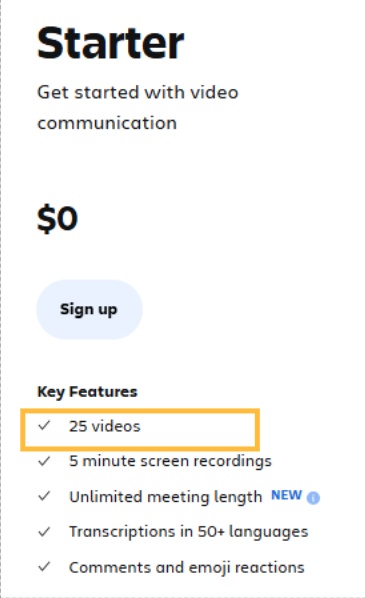
Pricing runs from a free plan with 25 videos and a 5-minute recording limit to Business at $18/user/month, Business+ AI at $24/user/month, and Enterprise at custom pricing. Annual billing saves approximately 20 percent (Business drops from $18 to $15/user/month, Business+ AI from $24 to $20/user/month).
The Atlassian acquisition introduced billing changes that caught teams off guard, and recording reliability issues including crashes, audio sync problems, and failed uploads have been consistently flagged across G2, Trustpilot, and Reddit throughout 2025 and 2026.
In this review, we’re checking out
For sales teams specifically, Loom is useful for creating personalized video messages, but does not automate how those videos get sent, sequenced, or delivered through LinkedIn.
You create the video. The outreach is still manual. SalesRobot's AI Voice Clone and video message features automate personalized video outreach as part of LinkedIn sequences, covering the execution layer that Loom leaves entirely to you.
Async video has become one of the more genuine productivity improvements available to remote and hybrid teams.
Instead of scheduling a 30-minute call (which, let's face it, we all secretly hate) to walk someone through a bug report, a product decision, or a sales demo, you record a Loom, share the link, and they watch it when it suits them.

The receiver can comment, react, and respond at their own pace.
The meeting that was going to take 30 minutes takes 5, and it happens asynchronously.

Loom built a dominant position in this category by getting the recording experience right. Two clicks to start, automatic upload, link copied to clipboard within seconds of finishing.
The friction is close to zero, which is why the behavior change it requires, replacing a meeting or email with a video, actually happens in practice rather than just in theory.
The acquisition by Atlassian in 2023 changed Loom's trajectory in ways that matter for teams evaluating it today.
Billing structure has shifted. Reliability issues have emerged. AI features were added at a new price tier. And for sales teams specifically, the core use case of personalized video outreach still requires manual effort at every step: recording, sharing, following up.

This review covers what Loom actually delivers, what each plan costs, where it earns its place, and where its limitations are most relevant for sales and GTM teams.
One important distinction upfront: Loom is a video creation and sharing tool. It helps you make and send async video messages. It does not automate the outreach, sequence the follow-up, or deliver video through LinkedIn. If automated personalized video and voice outreach is what your team needs, SalesRobot handles that execution layer directly, and we address how the two approaches compare toward the end.
Loom: What You Need to Know
✅ The recording experience is genuinely best-in-class for speed: Two clicks, automatic upload, link copied to clipboard. The friction from idea to shareable video is lower than any comparable tool.
Users consistently cite the zero-friction recording flow as the reason async video communication actually takes hold in their teams rather than stalling as a habit that is too inconvenient to maintain.

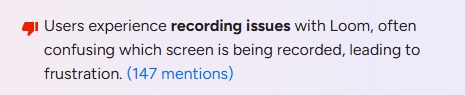
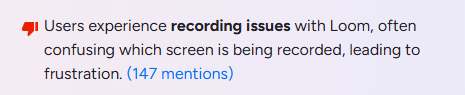
⚠️ Post-Atlassian reliability issues are documented and ongoing: Recording crashes, audio sync failures, and failed uploads are the top reported con on G2 with 147 mentions.
Loom's own troubleshooting documentation acknowledges the issues and recommends enabling a fallback recorder on Windows. These problems have been consistent across review platforms throughout 2025 and into 2026, and they appear systemic rather than isolated incidents.
✅ AI features on Business plus AI are genuinely useful for regular video producers: Auto-generated summaries, chapters, titles, and filler word removal on the $24/user/month tier are consistently praised by teams recording more than a few videos per week.
The AI-generated summary being accurate enough to share with stakeholders who do not want to watch the full video is a real time-saving feature rather than a cosmetic one.

⚠️ The Atlassian billing changes have caught teams off guard: The official Atlassian support documentation states that teams cannot stay on current pricing through the migration.
Accounts created after February 2026 do not have access to the legacy Creator Lite tier. Teams have reported invoices significantly higher than expected following migration, with billing structure changes arriving via email rather than proactive team communication.
Annual plans use tiered seat bands, meaning adding a small number of users can push the entire account into a higher price bracket.

✅ Viewer pricing is genuinely fair: Loom charges only for creators, which means the people who record videos, not for viewers. Anyone with a link can watch, comment, and react for free.
For teams where a small number of people create content that many others consume, this is a meaningful cost advantage over per-seat tools that charge for every audience member.
⚠️ The free plan's limits are hit within days of active use: The free tier provides 25 videos at up to 5 minutes each.
Active users, particularly sales reps sending personalized video messages daily, burn through all 25 slots within a week or two.
The 5-minute cap forces awkward cuts on demos, walkthroughs, and prospect-facing content that naturally runs 7 to 15 minutes. There is no mid-tier plan between free and Business.
Key Features
Screen and Camera Recording
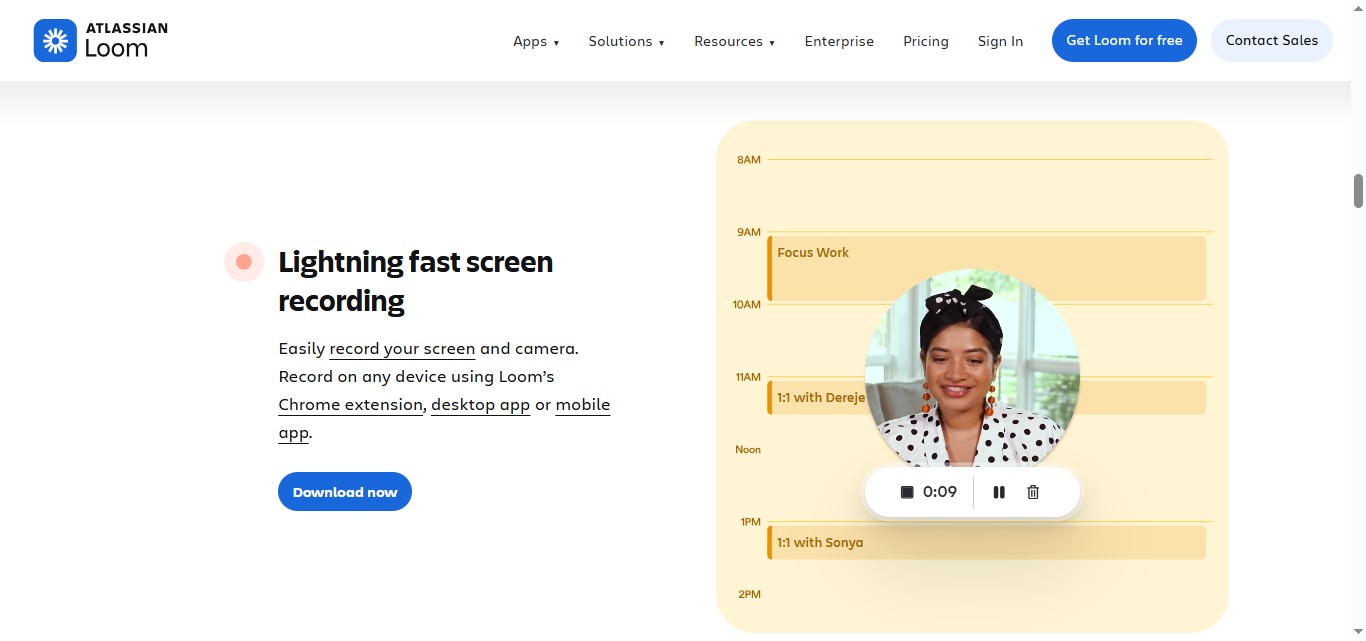
The core product. Loom records your screen, your webcam, or both simultaneously. The camera bubble overlay, which shows your face in the corner while recording your screen, is consistently cited as a feature that makes videos feel personal rather than instructional.
Recording can be initiated from the Chrome extension, the desktop app, or directly from supported integrations including Slack, Jira, and Notion.
The desktop app is generally more stable than the Chrome extension for longer recordings. For sales teams recording prospect-facing content, the desktop app reduces the risk of the reliability issues that Chrome extension users encounter more frequently.
Instant Link Sharing
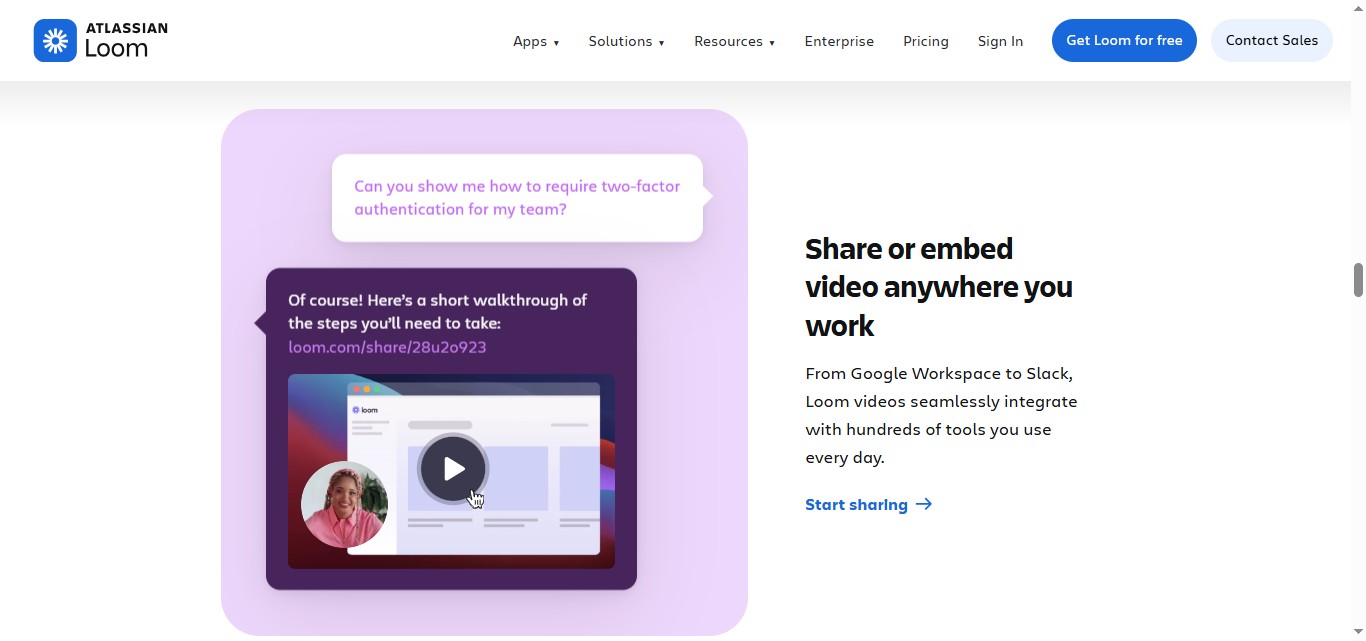
Every Loom generates a shareable link within seconds of recording completion. The link opens a branded landing page with the video, a comment thread, and emoji reactions.
Viewers do not need a Loom account to watch. This zero-friction sharing flow is what makes Loom practical for external outreach, prospect demos, and customer walkthroughs rather than just internal team communication.
AI Video Enhancement (Business plus AI Only)
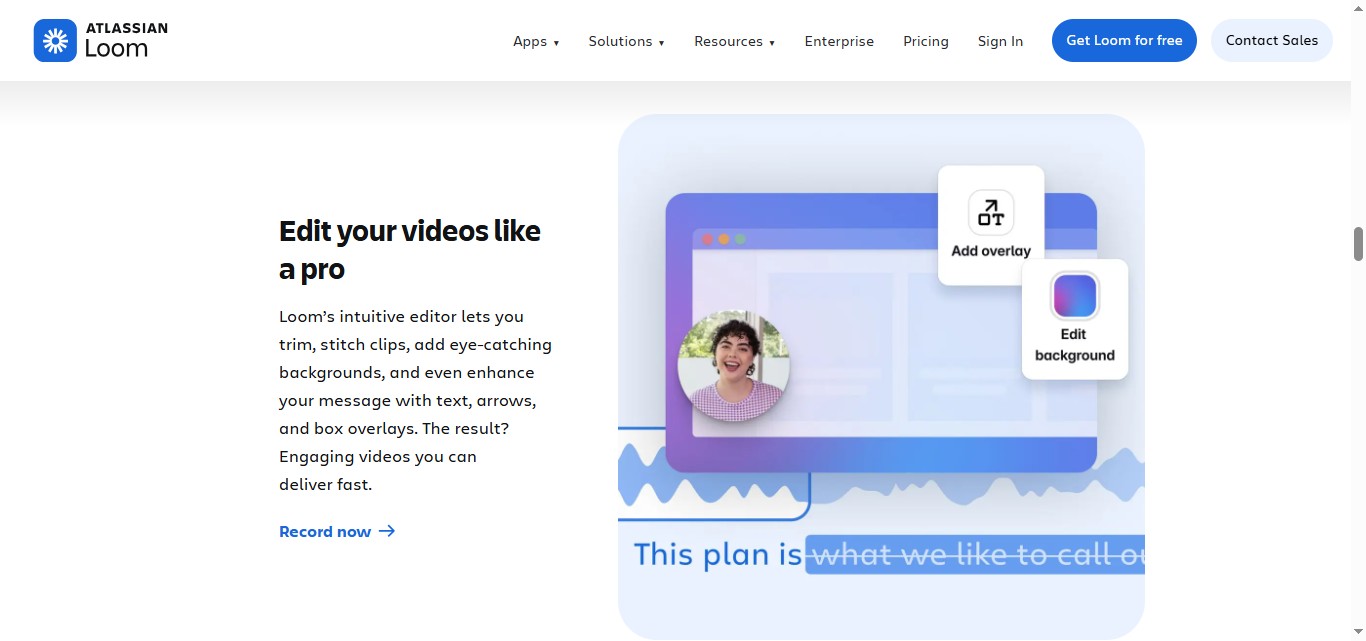
The Business plus AI tier adds the features that meaningfully differentiate Loom from free screen recording alternatives. Auto-generated titles ensure every video is labelled accurately.
Summaries give viewers a written overview before they decide to watch. Chapters break long recordings into navigable sections.
Transcript-based editing lets creators remove sections by deleting text from the transcript rather than manipulating a timeline. Filler word removal cleans up recordings without manual editing effort.
These features are locked to the $24/user/month Business plus AI tier. They are not available on the Business plan at $18/user/month.
Viewer Engagement Analytics
Business plan users can see who watched their video, how much they watched, and when. For sales teams, this is the feature with the clearest revenue impact: knowing that a VP of Sales watched your prospect video three times before replying is information that changes how a rep approaches the follow-up conversation.
Video Comments and Reactions
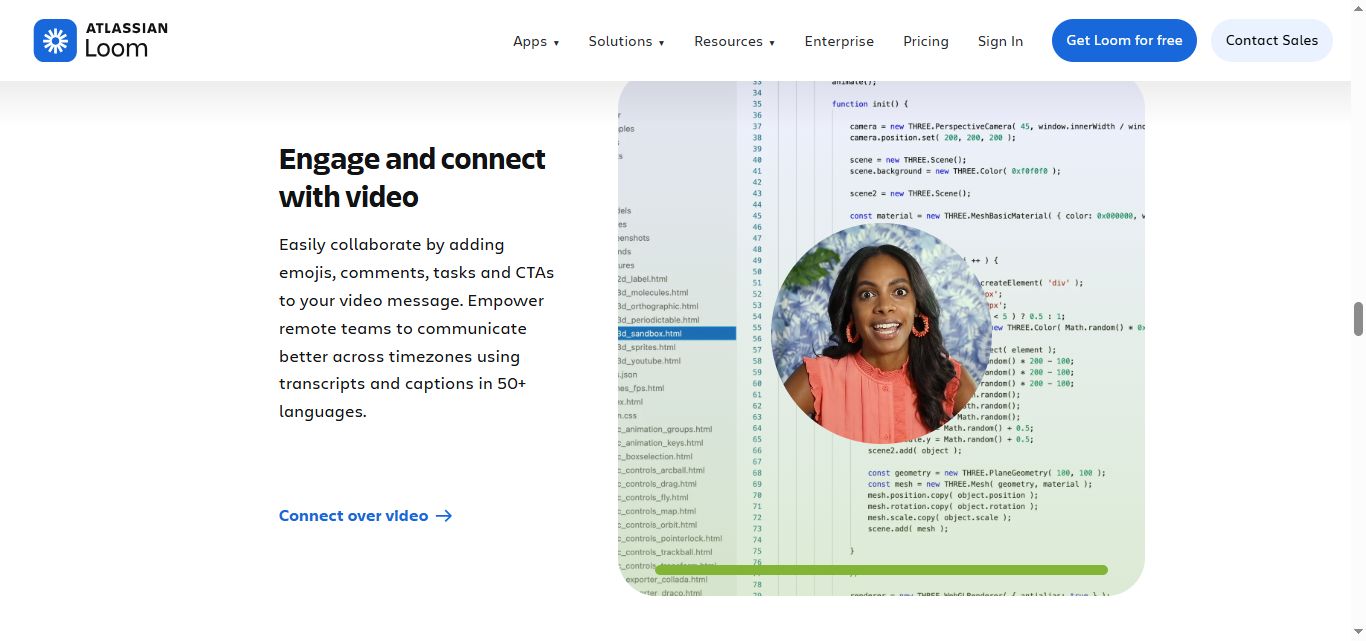
Viewers can leave timestamped text comments at specific moments in a video, react with emojis, and reply to threads. For async collaboration, this replaces the synchronous meeting where feedback gets consolidated: a product manager can walk through a design, leave the Loom, and return to timestamped feedback from multiple reviewers without scheduling anything.
Meeting Recording
Any paid plan includes automatic recording of live video meetings in Zoom, Google Meet, and Microsoft Teams. Recordings are stored in Loom and can be shared with the same link-sharing workflow as manually recorded content. On Business plus AI, meetings are automatically summarized and chaptered.
Integrations

Loom integrates with Slack, Gmail, Notion, Jira, Confluence, Salesforce (Enterprise), HubSpot, Intercom, and more. The Jira and Confluence integrations are native and deep post-acquisition, making Loom significantly more useful for Atlassian-stack teams than for teams on other project management platforms.
Custom Branding
Business plan and above allow creators to remove Loom's branding from the video page and embed player, and to apply their own colors and logo. For sales teams sending Loom videos to enterprise prospects, unbranded video pages are a basic expectation for credibility.
Personalized Video (Enterprise)
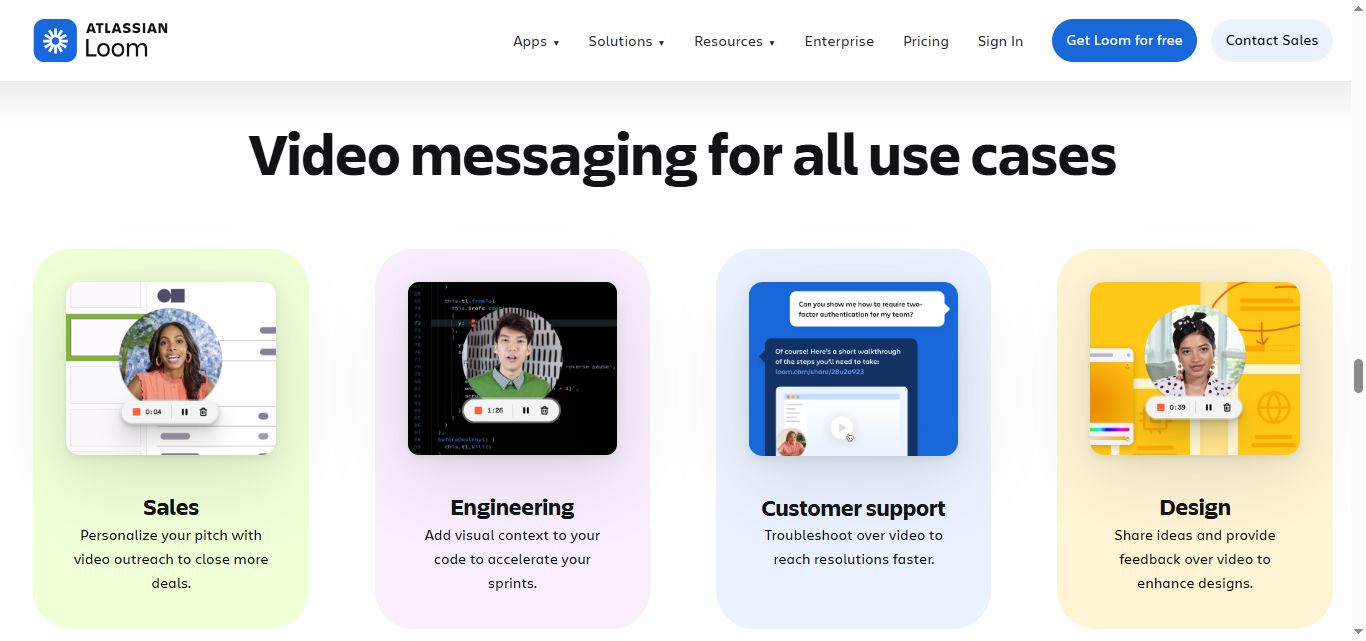
The Enterprise tier includes a one-to-many personalization feature where a single recording can be automatically customized for multiple recipients with personalized titles and audio clips. This is the closest Loom gets to automated personalized video outreach at scale, but it requires Enterprise pricing and still requires manual setup per campaign.
Loom Pricing
Loom charges per creator (the person recording videos). Viewers watch for free. All prices below are monthly billing rates per creator. Annual billing reduces costs by approximately 17 percent The free plan does not require a credit card.

Starter: $0/month
Business: $18/user/month (monthly) or $15/user/month billed annually
Business plus AI: $24/user/month (monthly) or $20/user/month billed annually
Enterprise: Custom pricing
Pricing note: Annual plans use tiered seat bands. Adding creators can push an account into a higher pricing band without notice, which has contributed to unexpected billing increases flagged by teams post-Atlassian migration.
What Works Well
✅The zero-friction recording flow is the strongest in the category. The most consistent reason teams stay on Loom despite the reliability concerns and pricing changes is the recording experience. Chrome extension, two clicks, automatic upload, link in clipboard.
No competitor has fully matched this end-to-end speed. For teams where async video has become a behavioral habit, the switching cost of losing that frictionless flow is real enough to outweigh cheaper alternatives.
✅AI summaries on Business Plus AI genuinely save time for high-volume producers. Teams recording more than a few videos per week consistently report that auto-summaries and chapters change how their videos are consumed. Stakeholders who would not watch a 15-minute recording will read a structured summary.
Reviewers describe sharing AI-generated summaries directly with leadership rather than the full recording, which is a meaningful change in how information moves through an organization.
✅Viewer engagement analytics give sales reps actionable follow-up context. Knowing that a prospect watched the first two minutes, skipped the middle, and rewatched the last thirty seconds three times is information that meaningfully improves follow-up specificity.
The analytics are not sophisticated by CRM standards, but they surface the signal that matters: who engaged, how much, and when.
✅Creator-only pricing is fair for teams with uneven recording patterns. Organizations where a few people produce video that many people consume pay only for the producers.
A 5-person content team publishing to a 200-person audience pays for 5 seats, not 200. For teams structured around this content-distribution pattern, the pricing model is significantly more economical than per-seat tools.
✅Atlassian integration is genuinely useful for Jira and Confluence users. Teams already running the Atlassian stack benefit from native Loom embedding in Jira tickets, Confluence pages, and project workflows.
Attaching a Loom recording to a bug report instead of writing a text description is a workflow improvement that is harder to replicate with non-native tools.
Potential Drawbacks
⚠️Post-Atlassian recording reliability is the most serious operational concern. Recording crashes, audio sync failures, and failed uploads have been the top G2 complaint with 147 mentions as of 2026.
Loom's own support documentation acknowledges these issues with recommended workarounds including enabling a fallback recorder on Windows. For a screen recording tool, requiring a fallback recorder is an indicator of a systemic reliability problem, not an edge case.
Teams whose workflows depend on Loom to record and share time-sensitive content, such as prospect demos, client walkthroughs, or incident reports, need to account for the possibility that a recording will fail.
⚠️Billing changes post-acquisition have caught teams off guard. Atlassian's official documentation states that teams cannot stay on legacy pricing through the migration.
Accounts created after February 2026 do not have access to Creator Lite tiers. Teams have reported significant invoice increases following migration emails that did not clearly communicate the financial impact in advance.
Annual plans also use tiered seat bands, meaning adding a handful of creators can push the entire account into a higher pricing band, producing a non-linear cost jump. Teams evaluating Loom should model their creator count scenarios before committing to annual contracts.

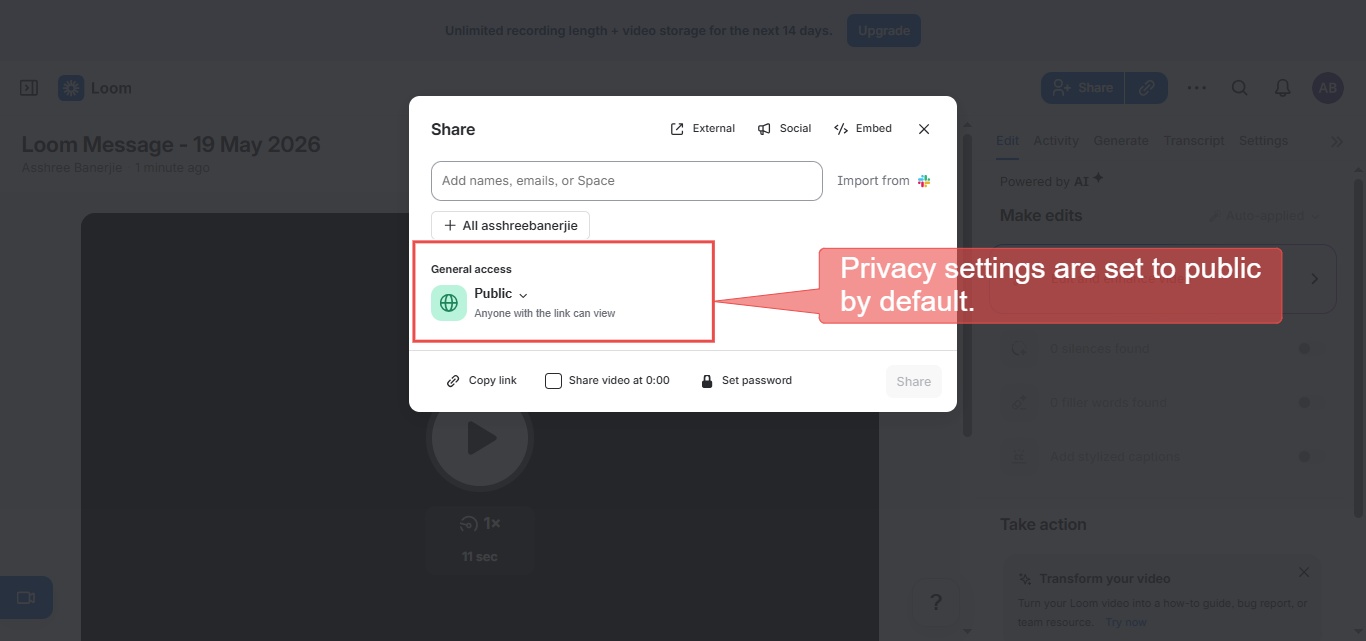
⚠️Privacy defaults require attention, especially for external sharing. New recordings in Loom default to private (visible only to the creator until a link is shared), but a workspace admin can set the default to public, and any shared public link lets anyone view the video without authentication. Teams should confirm their workspace default and check each video's link setting before sending sensitive content.
For content that includes internal strategy, customer data, product roadmaps, or prospect conversation details, this default is a genuine data governance concern rather than a minor setting.
Teams must remember to manually adjust privacy settings on every recording that should not be publicly accessible.
⚠️AI features require the $24/user/month Business+ AI tier. Auto-summaries, chapters, filler word removal, and transcript-based editing are all locked behind the Business plus AI plan.
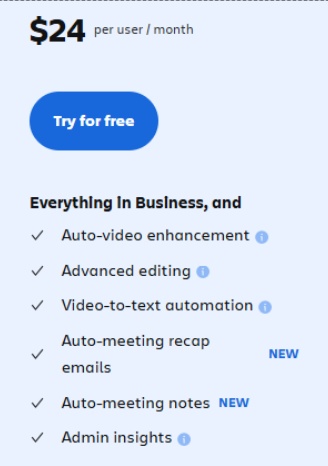
The Business plan at $18/user/month has the same unlimited recording features but none of the AI post-processing. There is no way to purchase AI features as an add-on to the Business plan.
⚠️The free plan is exhausted within days of active sales use. Twenty-five videos at five minutes each sounds adequate until a sales rep starts recording personalized video messages for prospects daily.
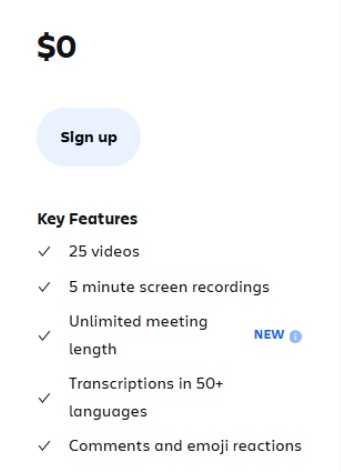
A rep sending two to three Looms per day fills the 25-video library in under two weeks, at which point older recordings must be deleted to create space.
The five-minute recording limit also prevents most real product demos, customer walkthroughs, and training recordings from fitting within the cap without awkward cuts or multi-part sequences.
⚠️Loom does not automate outreach. You still send every video manually. This is the most operationally important limitation for sales teams evaluating Loom as part of a prospecting stack. Loom creates the video.
Sending the link to a prospect still happens manually, whether via email, LinkedIn DM, or another channel. There is no sequencing, no automated follow-up, no inbox management, and no connection request automation. For sales teams that want personalized video to be part of an automated outreach sequence rather than a manual one-at-a-time effort, Loom does not solve that problem.
Who Should Use Loom
Loom is well-suited for customer success teams managing post-sale communication and walkthroughs, product teams sharing async updates and feedback reviews, software engineering teams documenting bugs and code walkthroughs, and content or marketing teams producing instructional and briefing videos for internal audiences.
The Business plus AI tier delivers the most value for teams recording multiple videos per week who want AI post-processing to reduce editing time and improve video discoverability.
For sales teams specifically, Loom works well for one-off personalized videos sent to key accounts during active deal cycles, async follow-ups after discovery calls, and high-touch customer walkthroughs.
It is less suited for high-volume outbound prospecting where personalized video needs to be part of an automated sequence rather than a manually sent individual message.
It is a harder sell for teams primarily focused on outbound volume who need automated video delivery rather than manual sharing, for budget-sensitive small teams where the $18 to $24 per creator monthly cost is difficult to justify for occasional use, or for teams whose workflows depend on the reliability of every recording succeeding on first attempt.
Loom vs SalesRobot: A Direct Comparison
| Features | Loom | SalesRobot |
|---|---|---|
| Primary Function | Async video recording and sharing | LinkedIn and email outreach automation |
| Video Messaging | Full screen and webcam recording, instant shareable links | AI Voice Clone generates personalized voice notes per prospect |
| How Video Gets Sent | Manually: you share the link via email, LinkedIn DM, or other channel | Automatically: voice notes and video messages sent as part of LinkedIn sequences |
| LinkedIn Capability | No native LinkedIn automation | Full native automation via mobile API |
| Outreach Automation | Not included | Connection requests, follow-up sequences, inbox management |
| AI Personalization | AI summaries, chapters, titles (Business + AI) | AI Variables from LinkedIn profile data, AI Voice Clone |
| Meeting Booking | Not included | AI Appointment Setter handles qualification and booking |
| Reliability | Recording crashes documented as top G2 issue (147 mentions) | Cloud-based via mobile API, stable operation reported by users |
| CRM Integration | Salesforce (Enterprise), HubSpot (Business) | Zapier for external CRM sync, built-in mini CRM |
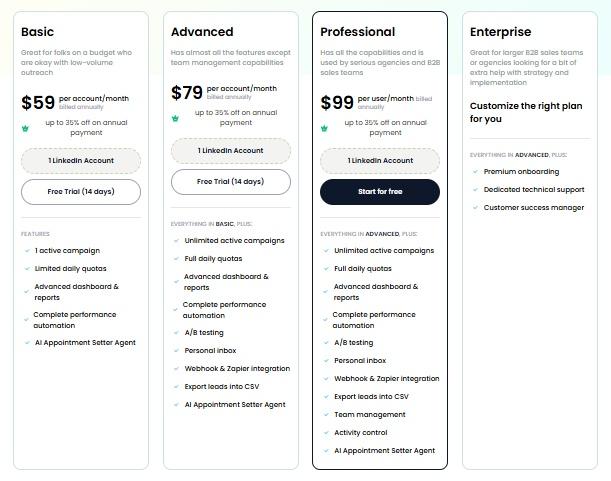
| Pricing Entry Point | Free (25 videos, 5 min limit), paid from $18/user/month | $59/month per LinkedIn account |
| Free Trial | Free plan available | 14 days, no card required |
| Best For | Creating async video messages manually sent to specific people | Automating personalized voice and video outreach at scale through LinkedIn |
SalesRobot: Worth Considering for Automated Video Outreach

Loom's value in a sales workflow is creating a personal, human video message that replaces or supplements a written email or LinkedIn DM.
The limitation is that creating a personalized Loom for each prospect and manually sending it does not scale beyond the highest-priority accounts.
For most outbound sequences, the manual effort makes per-prospect video messaging impractical at volume.
SalesRobot addresses the scale problem directly through its AI Voice Clone feature.

Record a short voice sample once, and SalesRobot generates an individualized voice and video note that sounds like you for every prospect in a sequence, automatically, as part of a multi-step LinkedIn campaign.
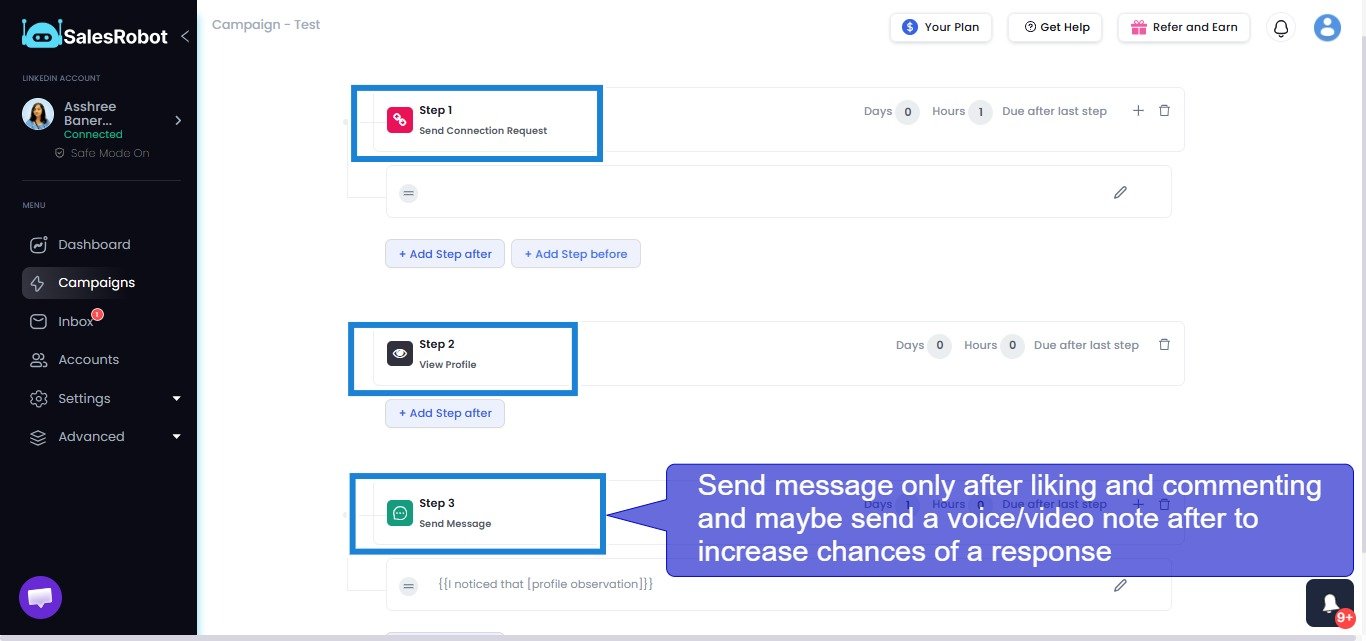
The voice note is sent through LinkedIn's native messaging as part of an automated sequence alongside connection requests and text messages, without manual effort per contact.
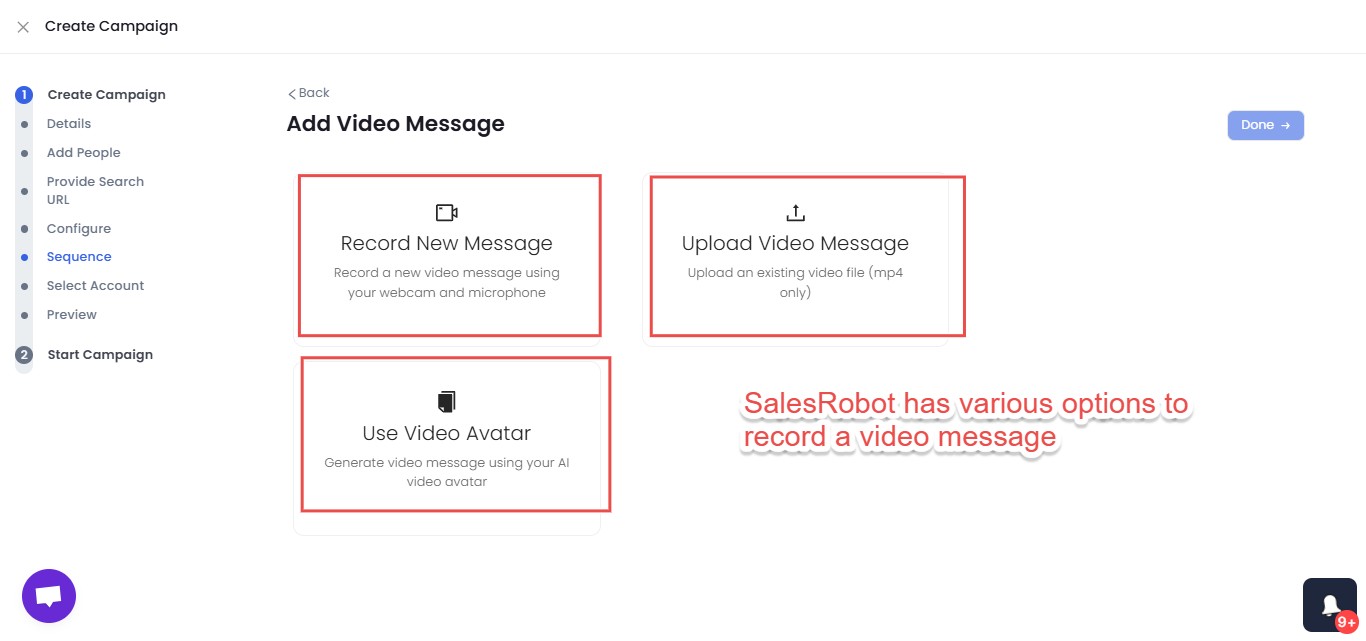
For teams that have used Loom to send individual personalized videos to key accounts and seen the reply rate lift that personal video creates, SalesRobot's AI Voice and Video Clone delivers a comparable personalization signal at the volume required for outbound prospecting, through LinkedIn's most effective engagement format, without the manual production time that makes per-contact Loom recording unsustainable.
SalesRobot connects through LinkedIn's mobile app APIs rather than browser automation, keeping activity looking natural and making account restrictions far less likely. Connection requests, follow-up sequences, and appointment setting all run automatically.

The AI Appointment Setter replies to leads instantly on your behalf in the LinkedIn inbox, nurtures and qualifies them, and keeps them engaged until they book a meeting — all without manual involvement. It is fully trainable on your company, product, and tone, and responds within minutes (waiting longer than 5 minutes to reply cuts conversion chances by 50%). It is available as an add-on across all plans, and no other LinkedIn automation tool offers this natively.
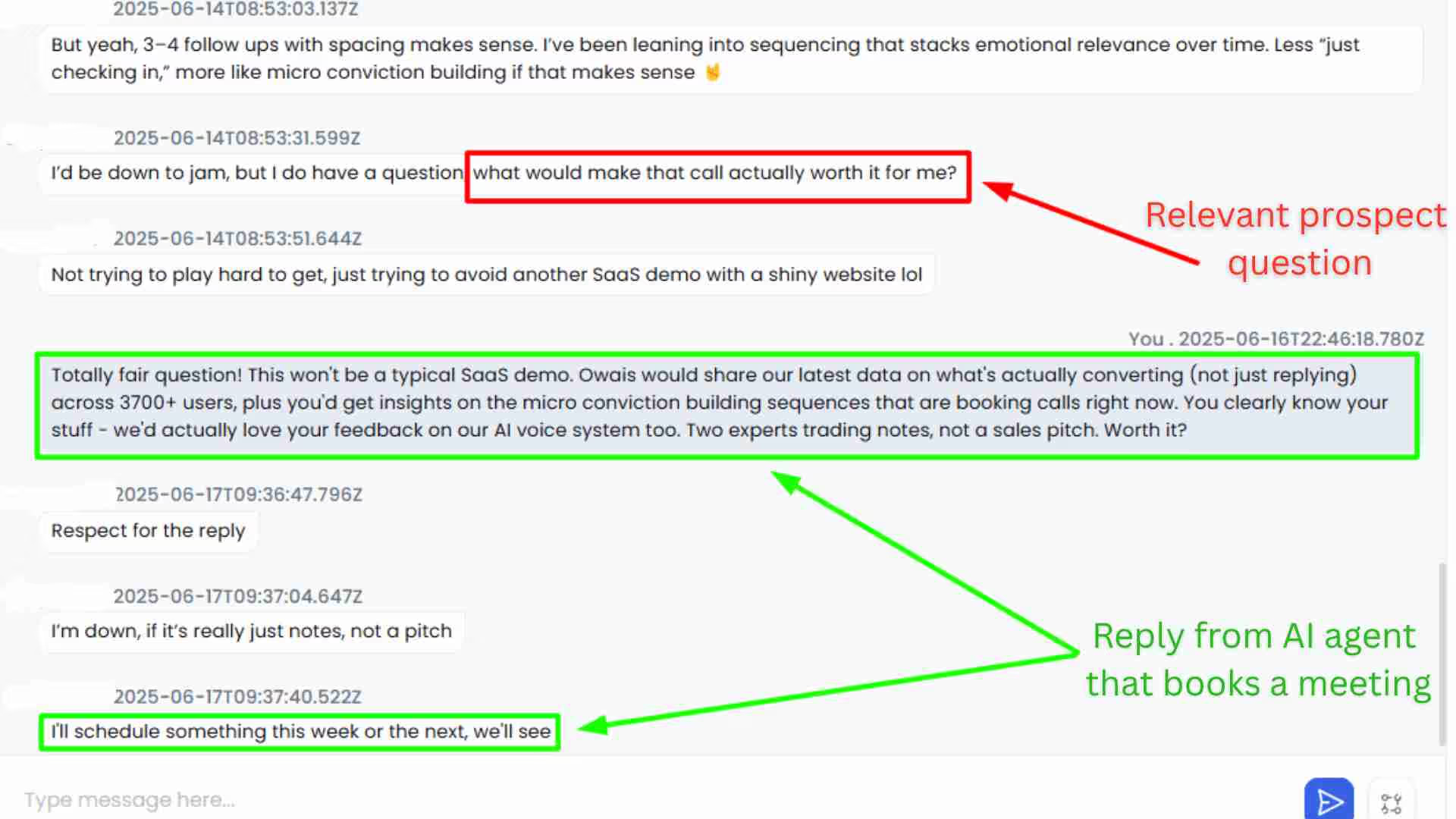
The distinction is clear: Loom is the right tool when you want to create a high-quality, carefully crafted async video for a specific person or audience. SalesRobot is the right tool when you want personalized voice and video outreach to be a standard, scalable part of every LinkedIn sequence without manual production per contact.
SalesRobot pricing (per LinkedIn account, 14-day free trial, no credit card required):
SalesRobot holds a 4.8 rating on G2 across 50-plus independent user reviews.
The Bottom Line
Loom remains the best async video recorder for the frictionless recording experience it delivers.
The zero-click-to-share workflow, the AI features on Business plus AI, and the viewer engagement analytics are all genuinely useful capabilities. For customer success, product, and engineering teams, Loom's position in the market is well-earned and the switching cost to alternatives is real.
For sales teams specifically, the picture is more complicated.
❌The post-Atlassian reliability issues are documented and ongoing.
❌The default public sharing setting requires manual intervention on every sensitive recording.
❌The billing migration has surprised teams with unexpected invoice increases.
❌And the core limitation for outbound sales use cases remains: Loom creates videos. You send them manually. At scale, that manual effort is the constraint that limits how much personalized video can actually be part of an outbound motion.
If automated personalized voice and video outreach through LinkedIn is what your team needs, SalesRobot's AI Voice Clone covers that execution layer directly, without the per-recording manual effort that Loom requires.
Both tools are independently testable before any financial commitment, with SalesRobot offering a 14-day free trial and Loom offering a free plan that lets you experience the recording workflow before paying.
Frequently Asked Questions
What is the difference between Loom Business and Business plus AI?
Both plans offer unlimited videos, unlimited recording length, and 4K quality. Business ($15/user/month annually, $18 monthly) adds custom branding, editing, and engagement analytics. Business plus AI ($20/user/month annually, $24 monthly) adds AI summaries, chapters, auto-titles, filler-word removal, and transcript-based editing. AI features cannot be bought as a Business add-on.
Are Loom videos private or public by default?
Loom videos are private by default in your workspace, visible only to you until you share the link. However, a workspace admin can change the default to public, and any public share link lets anyone with it view the video without a Loom account, so always check each video's link settings before sending sensitive content.
Are Loom videos accessible to non-Loom users?
Yes. Anyone with a shareable Loom link can view, comment on, and react to your video without creating an account or logging in. Viewers do not take up paid seats on your plan.
Can I download my Loom recordings to post elsewhere or store locally?
Yes, creators on paid plans (Business and Business plus AI) can download videos as MP4 files to use across other platforms, upload to YouTube, or archive locally. Free Starter plan users are restricted from downloading videos.
Does Loom offer auto-captions and transcripts on all plans?
Loom provides automatic transcription and captions in over 50 languages across all plans, including the free Starter tier. However, advanced transcript editing and filler-word removal are exclusive to the Business plus AI plan.
How does Loom handle video security and compliance?
Loom is SOC 2 Type II compliant and GDPR compliant. Paid tiers offer password protection, email domain restrictions, and workspace privacy controls. Advanced Enterprise controls include SSO (SAML), SCIM provisioning, and custom data retention policies.

Wow your leads by cloning yourself and sending personalized videos and voice notes to each lead on LinkedIn.
If you don't reply to leads within 5 mins, your chances of converting them fall by 50%. Our AI replies on your behalf instantly! (and yes, you can train it)

Don't shoot in the dark. Get detailed analytics on what's working

SalesRobot allows you to invite other team members, so that they can add their LinkedIn Account, run outreach campaigns and get amazing results just like you.
.avif)


Trusted by 4100+ innovative B2B sales teams and lead gen agencies

.avif)

.avif)




.avif)


Heading 1
Heading 2
Heading 3
Heading 4
Heading 5
Heading 6
Lorem ipsum dolor sit amet, consectetur adipiscing elit, sed do eiusmod tempor incididunt ut labore et dolore magna aliqua. Ut enim ad minim veniam, quis nostrud exercitation ullamco laboris nisi ut aliquip ex ea commodo consequat. Duis aute irure dolor in reprehenderit in voluptate velit esse cillum dolore eu fugiat nulla pariatur.
Block quote
Ordered list
- Item 1
- Item 2
- Item 3
Unordered list
- Item A
- Item B
- Item C
Bold text
Emphasis

Superscript
Subscript